
Sometimes you need to share an Excel file with people who use older versions of Excel (before Excel 2007).
In this case, you should save your file as Excel 97–2003 (.xls) instead of .xlsx.
Table of Contents
Method 1: Save One File as Excel 97–2003
Step-by-step:
- Open your Excel workbook.
- Click the File tab.
- Click Save As.
- Click the Save as type drop-down list.
- Choose Excel 97–2003 Workbook (*.xls).
- Click Save.
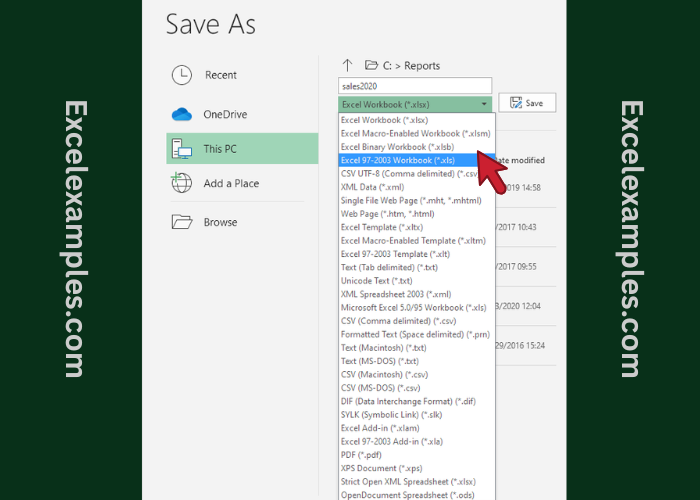
✅ Your file is now saved in the older format and can be opened on older computers.
Method 2: Always Save Files as Excel 97–2003 (Automatic)
Use this if you often work with older Excel users.
Step-by-step:
- Click the File tab.
- Click Options.
- Click Save on the left side.
- Find Save files in this format.
- Choose Excel 97–2003 Workbook (*.xls).
- Click OK.
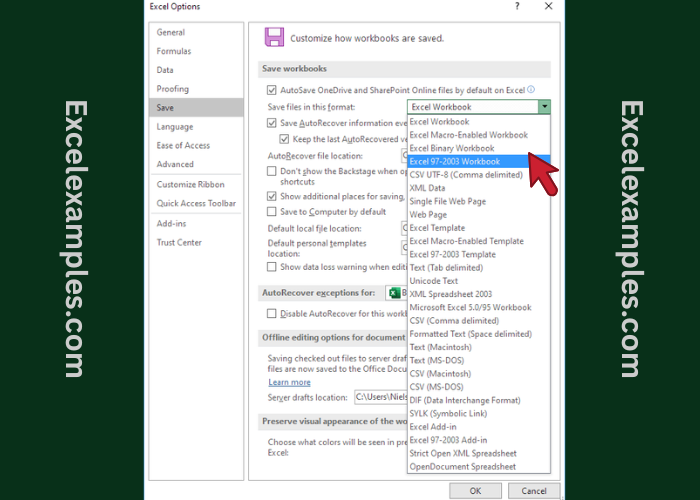
✅ From now on, Excel will automatically save new files as .xls.